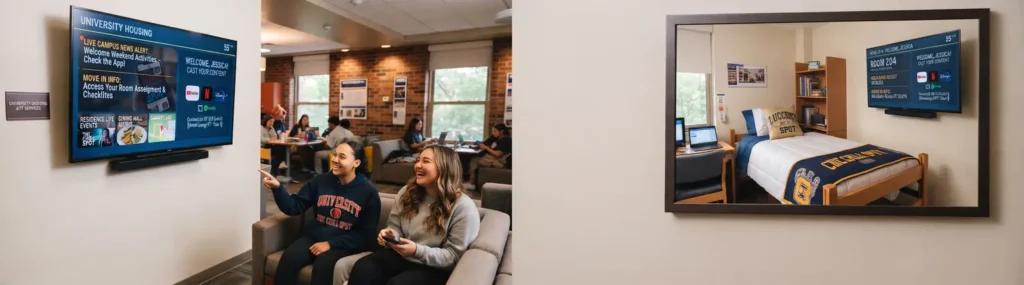
A residence hall TV that only delivers channels is easy to ignore. A screen that lets students cast their own content, find move-in information, see campus alerts, and access relevant services becomes part of the living experience. The right university dorm TV solution gives housing and IT teams a practical way to deliver that experience without inheriting another server-heavy system to maintain.
For universities, dorm television is no longer a simple cable decision. Students arrive with expectations shaped by personal streaming accounts, smartphones, and familiar TV interfaces. Meanwhile, campus teams need secure network behavior, consistent communications, and a platform that can be managed across hundreds or thousands of rooms from one place.
What a University Dorm TV Solution Must Do
A modern dorm TV platform has to solve two separate challenges at once. It should feel simple and familiar to students, while remaining controlled and manageable for the institution. Those goals are compatible when the platform is cloud-managed and designed for shared accommodation environments.
Students should be able to turn on the television and quickly access approved streaming apps, live TV or IPTV content, and secure casting from their personal device. They should not need to call the front desk equivalent, enter complicated network settings, or expose their content to the next resident who occupies the room.
For campus teams, the same screen should provide a controlled communication channel. Housing can publish move-in schedules, maintenance notices, laundry information, campus maps, wellness resources, dining updates, and event promotions. During an emergency or service interruption, a centrally managed home screen can help make critical messages visible where students are already spending time.
That combination changes the TV from a passive amenity into a practical resident communication channel.
Why Legacy Dorm TV Systems Create More Work
Many residence halls still rely on a mix of coaxial distribution, fixed channel lineups, separate digital-signage tools, and televisions with inconsistent settings. These environments can work, but updates are often slow and troubleshooting can become room-by-room work. Adding a message or refreshing branding may require involvement from multiple teams and systems.
Traditional server-based TV systems also introduce physical infrastructure that must be purchased, housed, monitored, and eventually replaced. This is a particular concern for campuses with older buildings, limited equipment space, or a mix of recently renovated and legacy halls.
A cloud-based approach reduces that operational burden. Instead of managing a local TV server and manually updating individual screens, authorized teams can control content, layouts, and app access through a browser-based CMS. New settings can be distributed remotely, which is valuable during summer turnover, midyear arrivals, and campus-wide communications.
| Server-based dorm TV model | Cloud-managed TV platform | |—|—| | Requires on-site server infrastructure | No on-premise TV server required | | Updates may involve local equipment or room visits | Content and settings can be managed remotely | | Limited flexibility for resident messaging | Home screens can carry branded campus content | | Hardware changes can slow expansion | Easier to scale across buildings and room types | | Separate systems may be needed for casting and communications | Casting, TV access, and messaging can work in one platform |
The right model still depends on the campus network, existing TV agreements, and building conditions. A university with a long-term managed IPTV contract may prioritize integration. A campus replacing aging coax infrastructure may prioritize a faster path to streaming and cloud control. The goal is not to force every residence hall into the same technical model. It is to give operations a manageable platform that fits the campus plan.
Secure Casting Matters in Shared Living Spaces
Casting is often the feature students notice first, but it must be designed for dorm use. Open casting methods can create privacy problems when multiple residents and devices share a network. Students should be able to send content to the television in their own room without seeing, connecting to, or interrupting another room’s screen.
A secure casting workflow typically uses a QR code or room-specific pairing process. The student scans the code displayed on the TV, connects from their phone or tablet, and casts without sharing passwords or leaving personal credentials on the television. When they leave, the session ends and the next resident starts fresh.
This matters at move-out as much as move-in. A dorm TV solution should avoid retaining personal accounts, viewing history, or device associations after a student has gone. It should also support network policies that keep resident devices appropriately separated while preserving an easy casting experience.
Campus IT should ask direct questions during evaluation: How is room-level pairing handled? What happens when a student checks out or changes rooms? Can casting be limited to approved network conditions? How are app logins and personal data cleared? A good provider should be able to answer these questions without treating security as an add-on.
Turn the TV Into a Campus Communication Channel
Residence life teams already work hard to reach students through email, apps, flyers, and social media. Those channels remain useful, but they compete with crowded inboxes and notification fatigue. The TV provides another visible touchpoint inside the residence hall.
The most effective content is relevant, brief, and tied to the resident experience. A branded launcher can feature dining hours, quiet-hour reminders, package pickup information, maintenance reporting instructions, upcoming events, and campus safety resources. Different halls can receive different content when needed. First-year housing may need orientation information, while apartment-style residences may benefit from parking or community-service updates.
Commercial opportunities also exist, although they should be handled with restraint. Campus dining promotions, bookstore offers, ticketed events, conference services, and approved local partnerships can be presented in a way that supports student life rather than overwhelms the interface with advertising. The screen should remain useful first. That is what gives promotional content value.
Deployment Should Fit the Academic Calendar
Residence hall technology projects have narrow windows. Summer turnover, winter break, and phased renovations are often the only realistic opportunities to install or refresh in-room equipment at scale. A platform that requires extensive local configuration can turn a manageable project into a race against move-in day.
A practical deployment starts with a representative pilot. Test the solution in one building or floor, using the actual campus network and a realistic mix of TVs, resident devices, and content. Confirm that casting works as expected, channels or streaming sources are available, and housing staff can update communications without filing a technical ticket for every change.
Once the pilot is approved, standardize the room setup. Preconfigure the launcher, define the content template, establish user permissions, and create a support process for resident questions. This reduces variation between halls and makes future expansion much easier.
Viggo Smart TV supports this model with a cloud-based Android TV and Google TV platform that can be configured centrally, deployed room by room, and updated without an on-site TV server. For a university managing multiple residence halls, that means less time spent maintaining infrastructure and more control over what residents see.
Questions to Ask Before Selecting a Platform
The buying decision should not center only on channel count or the price of each screen. Universities need to understand the operating model behind the service. Ask whether the platform can scale from a pilot building to the full housing portfolio, whether different halls can have their own content, and whether staff can make routine changes without vendor intervention.
Also examine hardware compatibility. Reusing existing commercial TVs may reduce upfront cost, while a refresh can offer more consistent performance and support. Consumer TVs may appear less expensive, but commercial-grade devices often provide better management options for high-turnover environments. The right choice depends on lifecycle plans and room conditions.
Finally, clarify support responsibilities. Housing, IT, audiovisual teams, and network operations all have a stake in the resident TV experience. Define who owns content, who handles device issues, who manages network access, and how urgent campus messages are approved and published. Clear ownership prevents the system from becoming another tool that no one fully manages.
A dorm TV experience should make a student feel at home without making campus operations harder. When secure casting, relevant information, and centralized control are built into the same platform, the television earns its place in every room.